HW4 - Parsing Data
Logistics
Due: Wednesday, Feb 4th at 10pm
You may work alone or with a partner, but you must type up the code yourself. You may also discuss the assignment at a high level with other students. You should list any student with whom you discussed each part, and the manner of discussion (high-level, partner, etc.) in a comment at the top of each file. You should only have one partner for an entire assignment.
You should submit your assignment on Gradescope. You submit the files shape_parser.py, weather_parser.py, and readme.txt.
Getting started:
You will work in two different files for this assignment. They are all included in this starter code. Remember to download it and double click to unzip the folder.
Goals
The primary goal for this assignment is to give you practice parsing CSV files. A secondary goal is to get you started thinking about how we can work with the data we use.
Parts of this assignment:
Comments and collaboration
As with all assignments in this course, for each file in this assignment, you are expected to provide top-level comments (lines that start with # at the top of the file) with your name and a collaboration statement. For this assignment, you have multiple programs; each needs a similar prelude.
You need a collaboration statement, even if just to say that you worked alone.
Here is the link for the HW4 Gemini helper bot. Remember that I’d appreciate you uploading an example interaction if you find this helpful so I can get an idea of if/how it is helpful and make sure it is providing accurate information.
Assessment
The core requirements are:
- correct implementation of Part 1: completing functionality of
shape_parser.py - Header with at least five lines that start with
#for each file - Basic style that can be checked automatically (not complete!)
- Collaboration statement at the top of each file (even if it just says that you worked alone)
- A
readme.txtthat includes your reflection (detailed below)
The advanced requirements are:
- Satisfy the core requirements
- correct implementation of Part 2: completing functionality of
weather_data.py - Descriptive headers for all files
- Descriptive variable names that follow
snake_case - Good line grouping and spacing (i.e. use blank newlines to group your lines of code)
- Make sure not to have code that computes the right answer by doing extra work (e.g., leaving a computation in a for loop when it could have occurred after the for loop, only once).
- Comments should be used for anything complex, and typically for chunks of 3–5 lines of code, but not every line.
(Core) Part 1: Parsing a CSV file into shapes
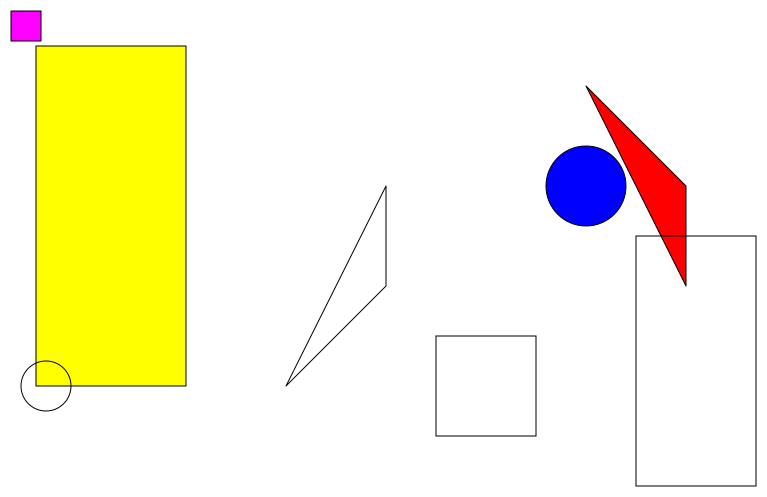
In this part, you will complete the implementation of a program that parses a .csv file into a window of shapes. An example is in shapes.csv:
window,800,600

circle,600,200,40,blue
triangle,700,200,700,300,600,100,red
rectangle,50,60,200,400,yellow
square,40,40,30,magenta

circle,60,400,25
triangle,400,200,400,300,300,400
rectangle,770,500,650,250
square,500,400,100
As you can see, most lines of the file contain either the window information or information for a single shape, and a shape may or may not have a color specified. Some lines are empty, and your code should simply ignore them (but not crash when they are encountered).
Note: there are useful libraries that can help you parse CSV files, but you should not use them for this assignment. I want to be sure that you can parse the file on your own first.
Part a: complete shape-parsing functions
For this first subpart, you should complete the implementations of the four shape-parsing functions:
parse_circleparse_squareparse_rectangleparse_triangle
Each function should take in a list of information about the shape, including a possible color. The specific list varies for each shape type. Your functions should create the relevant shape object from graphics.py, fill it in (if the provided list contains a color string), and return it. These functions have a return value (a shape object), but no side effect. They should not draw their shape.
Pay careful attention to the expected input types in the docstring for each function. For example, for a circle, note that it takes in a list of strings, and that list should have either three or four values in it:
def parse_circle(vals):
    """
    Creates a Circle object based on the values given in vals.

    Assumes vals is either a list [x,y,r,color] of strings,
    or [x,y,r].

    x: x-coordinate of center point (expect an int in the str)
    y: y-coordinate of center point (expect an int in the str)
    r: radius (expect a float in the str)
    color: optional color (str)

    Returns: the Circle object
    """
    # TODO: Part 1a
    return Circle(Point(0,0),0) # replace with your code
Part b: putting the pieces together
These functions all need to get used to parse a file into a list of shapes and a GraphWin object. An early part of software design is pseudocode. Pseudocode represents plans for code without having the actual syntax (so no colons, function calls, etc.). The function parse_shapes_from_file needs to read in the lines of the CSV file and parse each line (at least, each one that isn’t blank) into a shape. The pseudocode for this function is given to you in comments in the starter code.
def parse_shapes_from_file(filename):
    """
    Opens the file specified by filename for reading, and parses
    the window dimensions and the shapes.

    Returns: the Window object and a list of shapes
    """
    # Specify variables for the window and the shape list
    # Open the file for reading
        # Go through each line in the file
            # Skip over any empty lines
            # Split the line into strings on the commas
            # Use the first string in the line to determine which object to create
    # Return the window and shapes list

    # TODO: Part 1b
    pass # replace with your code
Complete this function. Note that you should plan to keep the pseudocode comments around; you don’t have to do work to comment this function, and they will hopefully help you as you code!
The parse_shapes_from_file function returns both a window and a list of shapes. It should not draw any shapes.
Note that this function requires you to return two values, which we haven’t seen before. Here is a short example. (It’s the same as unpacking a tuple when you call it!)
def f(x, y):
    """
    Returns the sum and difference of x and y.
    """
    plus = x + y
    minus = x - y
    return plus, minus # secretly it returns the pair as a tuple

def main():
    total, diff = f(10, 7) # total is plus, diff is minus
    print(total) # prints: 17
    print(diff)  # prints: 3

main()
Part c: drawing the shapes
One of the beautiful things about the shapes in graphics.py is that they all have a draw method. For a variable shape that represents any type of shape object, you can call shape.draw(win) to draw that shape in the GraphWin object win. This is called polymorphism.
To see this for yourself, you need to add a couple of lines of code to main to actually draw the shapes to the window.
Once you complete main, it will save the result to a file shapes.svg. This file won’t display very well in VSCode since it has no background, but if you double click on it and let it open in a web browser, you’ll see this:
(Advanced) Part 2: Visualizing weather data
Part a: parsing the data
You have a bunch of weather data from NOAA in weather_data.csv.
Disclaimer: All of the data is as-provided by NOAA, except the station name doesn’t have a comma.
Here are the first few lines of the file:
NAME,DATE,PRCP,SNOW,TMAX,TMIN
MINNEAPOLIS ST. PAUL INTERNATIONAL AIRPORT,1/1/2023,0,0,35,22
MINNEAPOLIS ST. PAUL INTERNATIONAL AIRPORT,1/2/2023,0.02,0.1,27,22
MINNEAPOLIS ST. PAUL INTERNATIONAL AIRPORT,1/3/2023,0.65,6,31,24
MINNEAPOLIS ST. PAUL INTERNATIONAL AIRPORT,1/4/2023,0.61,8.8,33,30
MINNEAPOLIS ST. PAUL INTERNATIONAL AIRPORT,1/5/2023,0.01,0.2,30,18
For the first task of this part, you should implement the parse_data function. This function should grab the date strings, precipitation and snow amounts (as floats) and minimum and maximum temperatures (as ints) for each date from the file, and return five lists.
Be careful with ordering: each line has the maximum temperature befor the minimum temperature.
Part b: processing the data
Given the data you parsed from the CSV file in Part a, you should be able to compute some statistics. Fill in the following function definitions: get_lowest_temp and get_highest_temp.
As a smaller example, here is how these functions should work (with smaller, made-up data):
date_list = ["1/2/2025", "2/5/2025", "7/7/2025"]
temp_list = [10, 4, 92]

d1, t1 = get_lowest_temp(date_list, temp_list)
d2, t2 = get_highest_temp(date_list, temp_list)

print(d1, t1) # prints: 2/5/2025 4
print(d2, t2) # prints: 7/7/2025 92
Part c: a better user experience
Finally, let’s make this temperature analysis based on what the user requests!
You should use the command line arguments to determine whether the user wants the “lows” or “highs” and the “min” or “max”. Remember that you can access the command line arguments with the special built-in list sys.argv.
Here is an example of using sys.argv. On the Terminal, you could type:
python example.py argument1 another_argument more
And in Python you could print:
print(sys.argv)
And then you would see printed:
['example.py', 'argument1', 'another_argument', 'more']
Use that information to implement this kind of interaction with this program:
python weather_parser.py lows min
The minimum low temperature in 2023 was -13 Fahrenheit on 2/3/2023.

python weather_parser.py highs min
The minimum high temperature in 2023 was 2 Fahrenheit on 1/30/2023.
Reflection
Were there any particular issues or challenges you dealt with in completing this assignment? How long did you spend on this assignment? Write a brief discussion (a sentence or two is fine) in your readme.txt file.