Flower Lab
This is a lab assignment, so it isn’t required to complete. However, the concepts and practice will help you on the homework, exams, and final project so I encourage you to make a serious effort on it during class and consider finishing it outside of class. If you do finish it and submit it to Moodle, you’ll earn an extra engagement credit.
I recommend creating a folder in COURSES for this lab as you usually do.
Exercise 1: A minimal class
You should again download the file graphics.py and put it into the folder for today’s lab. Also remember that you can refer to the graphics documentation for more details on the methods of graphics classes.
Then also download the file flower_starter.py and put it in your folder as well.
-
Run
flower_starter.pyto see the flowers that are made. Your first goal will be to make the same flowers but with improved code organization. - Create a file
flower.py. In it, importgraphicsandrandomand define a classFlower, like so:from graphics import * import random class Flower: -
Copy over the
draw_stemanddraw_flowerfunctions and turn them into methods of theFlowerclass by adding theselfparameter to both and indenting them. - Copy over
main(and theif __name__ == '__main__'block) and then edit it to work with your newFlowerclass by:- Creating a new instance of
Flowercallednew_flower - Calling
new_flower.draw_stem()andnew_flower.draw_flower()with the right parameters
- Creating a new instance of
- You should always aim to make small changes and then test that those changes work, so this is a good time to run your
flower.pywithpython flower.pyto make sure that you are still successfully drawing the flowers.
Exercise 2: Adding state to your class
You may have noticed that you aren’t really taking advantage of the Flower class at the moment, especially since it doesn’t have any state! Let’s fix that by making a constructor and using state to organize our program.
-
Create a constructor with
def __init__that takes a window, x coordinate, height, and color as parameters and sets them to instance variables usingself.. Remember that the first parameter needs to beself. -
Change your
draw_stemanddraw_flowerto rely on the instance variables instead of needing parameters. -
Update your
mainto pass parameters toFlower()instead of the drawing methods. Remember to test your code at this point to make sure that it works still. -
We can do some further streamlining by having the drawing methods set instance variables instead of returning. Remove the return values from both
draw_stemanddraw_flowerand have them create instance variablesself.stemandself.center_circleinstead. -
A flower doesn’t really exist unless it’s drawn, so switch to calling
self.draw_stem()andself.draw_flower()inFlower’s constructor instead of inmain. -
You can now cut out several lines of code in
main(yey!) and just append yournew_flowertomy_flowersimmediately after creating it! Doesn’t that look much tidier?
Exercise 3: Leveraging OOP
Now that we have much more contained logic for our flowers, we can add new functionality more easily. Let’s make our flowers grow!
-
If our flowers are going to grow, then they need to start off small, so change their initial
self.heightto 1 and remove thedraw_flowercall in the constructor. You should also remove theheightparameter, since we don’t need it anymore (remember to updatemainaccordingly). -
Add a new instance variable
self.agethat starts at 0. - Define a new method
grow, which does the following:- adds 5 to the height;
- undraws the current stem with
self.stem.undraw(); - draws a new stem by calling
self.draw_stem(); - checks if
self.ageis equal to 4, if it is, callsself.draw_flower(); - increments
self.ageby 1.
- Add an
import timeat the top of your file and the following to yourmainoutside of the existing for loop:for i in range(7): time.sleep(0.5) #pauses for 0.5 seconds so we can savor the flowers for flower in my_flowers: flower.grow()Remember to run your code at this point to see how it is looking!
- You probably noticed that the flowers didn’t continue to grow with the stems, oops! Fix that by using the
movemethod ofCirclelike so:elif self.age > 4: self.center_circle.move(0, 5) #doesn't move along x, just 5 upRun your code again to see how your flowers are doing.
- Hmm, that stem is not cooperating! You can call
undrawand thendrawto get the flowercenter_circleto stay on top:self.center_circle.undraw() self.center_circle.draw(self.window) - Verify that you now have lovely growing flowers!
Exercise 4: Better flowers
You can definitely make better flowers than just a circle, though graphics is a little bit limited. Check out flower_with_petals.py for an idea of how to use move and more Circles to make a flower that looks like this:
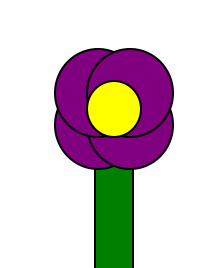
A few things to think about while you do it:
- I recommend that you make a
draw_petalmethod as well as adraw_petalsmethod. - You’ll want to save your petals into a list that is an instance variable and add any other instance variables that make sense.
- I recommend also making a
move_flowermethod and possibly arefreshmethod that handles theundrawanddrawcombo. - You should generally aim for your methods to be 10 lines or less, it’s not always easy to write them that way, but it is a lot easier to read them!
- Remember to make small, incremental changes and run your code frequently.
Submission
Submit your completed flower.py to Moodle for an extra engagement credit.
Extra
There is so much that you can do to expand your flower simulation! Here are some ideas:
- Allow for lots more colors with
color_rgb - Have your flowers stop growing and start losing petals at a certain age (and perhaps even dying!)
- Change your “time” loop in
mainto be an indefinitewhileloop and allow the user to add more flowers. You can usecheckMouse()to check for a user click without locking up your simulation.checkMouse()returnsNoneif the user hasn’t clicked and otherwise returns thePointlike usual. This is probably a good time to make acheck_for_new_flowerfunction outside of yourFlowerclass. - Add leaves!
- Make the number of petals/leaves or length of the stem of the flower somewhat random and perhaps even influence how fast the flower dies
- Make a new file
Plant.pythat defines another class that is a different kind of flower or plant. Perhaps it has different flowers/leaves and ages differently. You can useinputto let the user choose which kind of plant they want after they click. - Have the flowers “sway” slightly by shifting back and forth each day with the
movemethod of each component shape - Make a caterpillar class that randomly moves around the screen and eats flowers that it runs into (this will be tricky, you’ll have to calculate if it ran into any of the flowers based your calculations of the space they take up!)
- Add a chance for random events like storms or allow the user to water the flowers to keep them from dying (again this will be tricky, you’ll have to see where the user clicks and see which flower, if any, it overlaps)